
An updated, maintained version of pyOBD, the free and open-source car diagnostics app, supporting current versions of macOS (including Apple Silicon), Windows and Linux, and improving the app along the way.
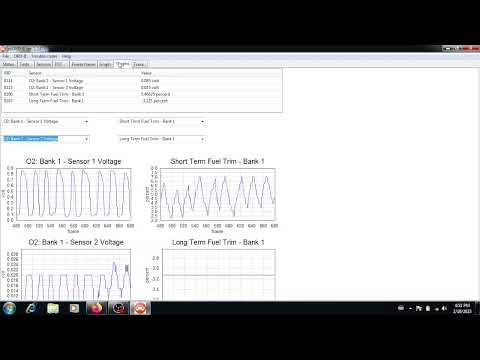
pyOBD talks to your car through a cheap ELM327 adapter (USB, Bluetooth or WiFi). You can view live sensor data and graphs, readiness tests and freeze frame data, and read and clear engine trouble codes (DTCs).
This project is a fork of barracuda-fsh/pyobd. See Credits.
(Recorded for the original project.)

- What's new in this fork
- Prerequisites
- Installation
- Usage
- Building the app yourself
- Development
- To-do list
- Credits
- Native Apple Silicon build. The old macOS app was Intel-only and ran through Rosetta, which made it slow to open and triggers the "will not be supported in future versions of macOS" warning.
- WiFi ELM327 adapters. Choose
MANUAL / WIFIin Configure and entersocket://IP:PORT(original issue #8). - Manual protocol selection in Configure, for cars where auto-detection picks the wrong protocol (#36).
- More stable connections on older cars (ISO 9141, KWP2000, J1850). A single slow reply no longer drops the connection and starts a reconnect loop (#62).
- The window fits your screen. It opens at a sensible size, centered, and remembers where you left it (#43).
- No more error messages in the terminal when you disconnect (#53).
- Simpler requirements that install on current Python versions (3.10 to 3.14) (#58, #61).
You need an ELM327 adapter, a computer, and a car that supports OBD-II. All cars sold in the USA since 1996 and all petrol cars in Europe since 2001 (diesels since 2004) should support it.
NOTE: pyOBD reads engine data only, not airbag, ABS or body control modules. Those need a more specialized program.
Which ELM327 adapters have been reported to work? Most adapters that cost $10 or more should work. These have been tested:
- VGate vLinker FS USB
- OBDPro USB Scantool
- OBDLink SX USB
- Chinese OBD2 1.5 USB
- VGate iCar Pro BLE (Bluetooth 4.0)
- AUTOHIL AX2 (Bluetooth)
If your adapter works (or doesn't), please open an issue so it can be added to the list.
Which adapters are good?
- USB gives the most stable and fastest connection. The vLinker FS USB is a good, well-priced choice.
- Bluetooth is slower and less reliable. The Vgate iCar Pro is a good choice.
- WiFi adapters work too (see WiFi adapters).
- Chinese clones: if you buy one, look for a PIC18F25K80 chip and an FTDI chip (for USB), ideally with firmware 1.5. The Konnwei KW903 (about $15) is an affordable branded option, but the iCar Pro is better. OBDLink and Vgate adapters also get firmware updates.
Download the app for your system from the releases page, or run it from source as shown below. Running from source needs Python 3.10 or newer.
Download pyobd-…-macos-apple-silicon.zip (M1 and newer) or pyobd-…-macos-intel.zip, unzip it and move pyobd.app to Applications.
The app isn't signed with an Apple developer certificate yet, so the first time you open it macOS will block it. Go to System Settings → Privacy & Security, scroll down and click Open Anyway. You only need to do this once. Or run this once in Terminal:
xattr -dr com.apple.quarantine /Applications/pyobd.appNo extra permissions are needed on macOS. USB and paired Bluetooth adapters show up as /dev/tty.* ports.
Most USB adapters work on current macOS without installing a driver.
To run from source:
git clone https://github.com/aidan846/pyobd.git
cd pyobd
python3 -m venv .venv
source .venv/bin/activate
pip install -r requirements.txt
python pyobd.pyDownload pyobd-…-windows.zip, unzip it and run pyobd.exe inside the pyobd folder.
The app isn't signed with a paid certificate yet, so the first time you run it Windows may show "Windows protected your PC". Click More info → Run anyway. Some antivirus programs wrongly flag apps built with PyInstaller. If yours does, run pyOBD from source as shown below.
Install the driver for your ELM327 adapter if it needs one. If no driver came with your adapter, the drivers can be found here.
To run from source, open a terminal in the pyobd folder (the one that contains requirements.txt) and run:
python -m venv .venv
.venv\Scripts\activate
pip install -r requirements.txt
python pyobd.pyDownload pyobd-…-linux.tar.gz, extract it and run ./pyobd/pyobd, or run from source as shown below.
Give your user access to serial ports, then log out and back in (or restart):
sudo usermod -a -G dialout $USER
sudo usermod -a -G tty $USER
USB adapter not showing up on Ubuntu? The brltty braille display service grabs CH340 USB-serial chips, which many ELM327 clones use, so /dev/ttyUSB0 never appears. If you don't use a braille display, remove it:
sudo apt remove brlttyThis works on Ubuntu 24.04+ and Debian 12/13 without compiling anything:
sudo apt install python3-wxgtk4.0 python3-serial python3-numpy python3-pint
python3 pyobd.pyPyPI has no Linux wheels for wxPython, so pip install wxPython compiles it from source, which can take close to an hour. Use the prebuilt wheels from wxpython.org instead (pick the folder that matches your distro from this list):
python3 -m venv .venv
source .venv/bin/activate
pip install -f https://extras.wxpython.org/wxPython4/extras/linux/gtk3/ubuntu-24.04/ wxPython
pip install -r requirements.txt
python pyobd.py
If you do need to build wxPython from source, install the build dependencies first (Ubuntu 24.04):
sudo apt install build-essential python3-dev libgtk-3-dev libwebkit2gtk-4.1-dev libgstreamer-plugins-base1.0-dev libnotify-dev libsdl2-dev libsm-dev libxtst-dev libglut-devOn NixOS, a shell.nix with python3.withPackages (p: [ p.wxpython p.pyserial p.numpy p.pint ]) works.
- Plug the ELM327 adapter into the car's OBD port and connect it to your computer.
- Turn the ignition on. You don't have to start the engine.
- In pyOBD, open OBD-II → Configure, pick the port (or leave it on AUTO) and click OK.
- Click OBD-II → Connect.
AUTO port and baud detection work in most cases. Choosing the port and baud rate manually is faster and the most reliable. If auto-detection picks the wrong protocol for your car, you can set it manually in Configure.
Once connected, you can view TESTS, SENSORS, FREEZE FRAME data and live GRAPHS, and read and clear TROUBLE CODES. Most sensors only show data while the engine is running. If you connect and then start the engine, wait a moment for the app to reconnect.
Misfire counts are reported per cylinder number as defined by the manufacturer, not per position in the firing order. Check a diagram of your engine if the numbers don't seem to match.
WiFi ELM327 adapters create their own WiFi network.
- Connect your computer to the adapter's WiFi network (often called
WiFi_OBDIIor similar). - In Configure, choose MANUAL / WIFI and enter the adapter's address:
That is the most common address. Some adapters use
socket://192.168.0.10:35000192.168.0.10:23or192.168.1.10:35000, so check the adapter's manual or its mobile app settings. - Click OK, then Connect. The baud rate setting is ignored for WiFi.
You can also type any serial port that wasn't detected automatically (for example /dev/rfcomm0 or COM7) into the same box.
Pair the ELM327 adapter once, then expose it as a serial device with rfcomm.
This was verified on Ubuntu 24.04 with an ELM327 Bluetooth adapter. The tested adapter
connected reliably on RFCOMM channel 2; channel 1 connected but disconnected
shortly afterwards.
Install the Bluetooth tools:
sudo apt-get install bluetooth bluez bluemanPair and trust the adapter. Replace XX:XX:XX:XX:XX:XX with the adapter's MAC address:
bluetoothctl
scan on
pair XX:XX:XX:XX:XX:XX
trust XX:XX:XX:XX:XX:XX
quit
Create /dev/rfcomm0 on RFCOMM channel 2 and leave this command running:
sudo rfcomm release rfcomm0
sudo rfcomm connect rfcomm0 XX:XX:XX:XX:XX:XX 2
Start pyOBD in a second terminal, open Configure, select /dev/rfcomm0, choose baud rate 38400, and click Connect.
If you prefer a binding that does not keep rfcomm in the foreground, use bind instead of connect:
sudo rfcomm release rfcomm0
sudo rfcomm bind rfcomm0 XX:XX:XX:XX:XX:XX 2
On Windows, pair the adapter in Bluetooth settings and use the outgoing COM port it creates. On macOS, pair it in System Settings and pick its /dev/tty.* port.
pip install -r requirements-dev.txtmacOS (builds a native app for the Mac you build on, at dist/pyobd.app):
pyinstaller --noconfirm --windowed --onedir --name pyobd -i pyobd.ico --add-data "pyobd.ico:." pyobd.pyWindows:
pyinstaller --noconfirm --windowed --onedir --name pyobd -i pyobd.ico --add-data "pyobd.ico;." pyobd.pyLinux:
pyinstaller --noconfirm --windowed --onedir --name pyobd -i pyobd.ico --add-data "pyobd.ico:." pyobd.py--onedir starts much faster than --onefile, which has to unpack itself to a temporary folder on every launch.
Releases are built automatically by GitHub Actions (.github/workflows/release.yml). Update the version number in pyobd.py (window title) and pyproject.toml, commit, then push a tag:
git tag v1.21
git push origin v1.21
GitHub builds the macOS (Apple Silicon and Intel), Windows and Linux apps and publishes them on the releases page. To test the builds without releasing, open the Actions tab, pick release, and click Run workflow.
Tests connect to a simulated ELM327 adapter (ELM327-emulator) over the network, the same way a WiFi adapter is reached:
pip install -r requirements-dev.txt
python -m unittest discover -v -s tests -t .
You can also run the emulator yourself and connect the app to it with socket://127.0.0.1:35000:
elm -n 35000 -s carSee IDEAS.txt for planned features and ideas. Suggestions are welcome in issues.
- Aidan (aidan846): current maintainer of this fork.
- Jure Poljsak (barracuda-fsh): revived pyOBD in 2021, ported it to Python 3 and the python-OBD library, and maintained the original repository.
- Charles Donour Sizemore: original author of pyOBD (2004).
- SeCons Ltd.: contributions in 2008–2009.
- Everyone who contributed fixes and reports to the original project.
pyOBD is free software, licensed under the GNU General Public License v2 (see COPYING).
