
Look up any Windows error code offline: HRESULT, Win32, NTSTATUS and Windows Update codes, with names, meanings and links.


Download · Features · Privacy · Full guide · License
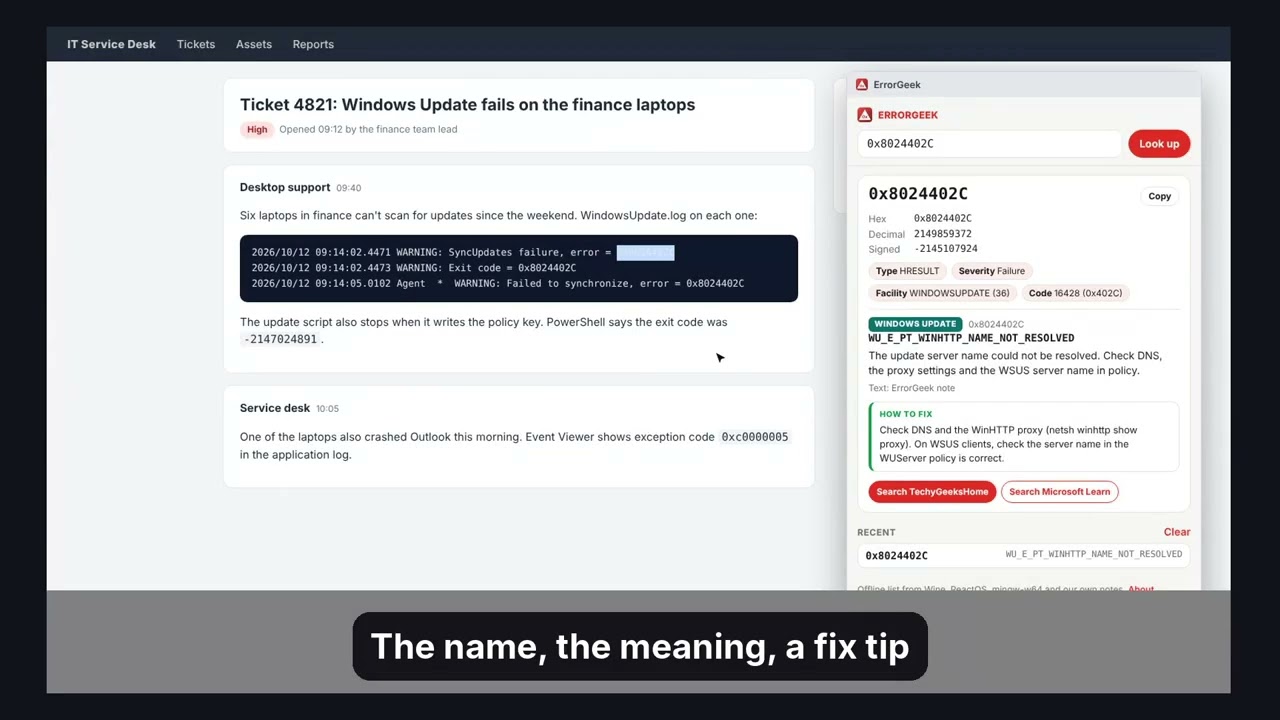
Look up any Windows error code in a second, without leaving the page. Type or paste a code, or select one on any web page and right-click Look up error code. ErrorGeek shows the name, the meaning, how the number breaks down and, for common codes, what to try first. It all comes from a list built into the extension, so it works offline.
The full guide, with every step explained, is on TechyGeeksHome.


- Reads any format:
0x80070005,80070005,-2147024891,2147942405,5,0xC0000005, and codes inside a line of log text. - Shows every form of the number: hex, decimal and signed (the negative number PowerShell and some logs print).
- Breaks the code down: HRESULT or NTSTATUS, severity, facility (name and number) and code.
- Names and meanings for over 3,500 Win32 errors, 4,200 HRESULTs, 2,900 NTSTATUS codes and 465 Windows Update codes, with message text for over 3,100 of them.
- Finds the error inside the error: an HRESULT like
0x80070005also shows the Win32 error it wraps (ERROR_ACCESS_DENIED), and the same for wrapped NTSTATUS and Setup API codes. - Windows Update codes (
0x8024xxxx) with short plain English notes for the common ones. - Configuration Manager (SCCM) and Intune codes (
0x87D0xxxx,0x87D1xxxx) are decoded, with short notes for the common ones (like0x87D00324and0x87D00607). - Windows servicing codes (
0x800F08xx) such as0x800F081Fand0x800F0922. - How to fix: short, plain English tips for about 70 of the codes admins see most, including which log to check.
- Search links for TechyGeeksHome and Microsoft Learn on every result.
- Recent lookups in the popup, so you can jump back to a code.
- It does not send your codes anywhere. Search links only open when you click them.
- It does not have message text for every code. Where the open source lists only have a name, ErrorGeek says so and gives a reading of the name instead.
- It only has notes for the most common Configuration Manager and Intune codes, because no open licence list of them exists. For the rest it decodes the parts and gives you search links.
- The fix tips are a starting point, not a full guide. Always check the logs on the device.
Pick the download for your browser from the latest release.
| Browser | Download |
|---|---|
| Chrome, Brave, Opera, Vivaldi | ErrorGeek-chrome.zip |
| Microsoft Edge | ErrorGeek-edge.zip |
| Firefox (142 or newer) | ErrorGeek-firefox.zip |
ErrorGeek.zip is the same package as the Chrome and Edge downloads.
- Unzip the download somewhere you'll keep it.
- Open
chrome://extensions(oredge://extensions). - Turn on Developer mode.
- Click Load unpacked and pick the
errorgeekfolder.
- Open
about:debugging#/runtime/this-firefox. - Click Load Temporary Add-on and pick
ErrorGeek-firefox.zip.
Firefox removes temporary add-ons when it closes.
The code in this repo is the Chromium version. manifest.firefox.json is the Firefox manifest. Run ./build.sh to make every package in dist/.
- Click the ErrorGeek icon and type or paste a code, then press Enter.
- Or select a code on any web page, right-click it and pick Look up error code. A small window opens with the answer.
- Click a name to copy it, or use the search links for more help.
decode.jsfinds the code in the text, works out its hex, decimal and signed forms, splits it into its parts and looks it up.errors.jsonis the offline list.tools/build_db.pybuilds it from the Wine, ReactOS and mingw-w64 source files listed inLICENSE-data.txt.tools/notes.json(Windows Update notes) andtools/extras.json(ConfigMgr, Intune and servicing notes, and the fix tips) are written for ErrorGeek and merged in bytools/add_extras.py.background.jsonly adds the right-click menu and opens the lookup window.tests/unit.test.jschecks the parser and the lookups (node tests/unit.test.js).
ErrorGeek has no account, no analytics and sends nothing anywhere. Every lookup happens on your own computer. The only thing it stores is your list of recent lookups, on your own computer.
ErrorGeek is free and always will be. If it saved you some time, you can buy us a coffee on Ko-fi. Welcome, but never expected.
Found a bug or have a request? Open an issue or get in touch. Pull requests are welcome.
GPL-3.0. Free for everyone, including commercial use.
The error list is built from open source projects: Wine (LGPL-2.1-or-later), ReactOS (GPL-2.0-or-later) and mingw-w64 (public domain). See LICENSE-data.txt for the exact files and versions. No text was copied from Microsoft documentation: the notes and fix tips are our own words.
ErrorGeek is an independent tool made by TechyGeeksHome. It is not made by or connected to Microsoft. Windows, Configuration Manager and Intune are trademarks of Microsoft.
© 2026 TechyGeeksHome.
Made with ❤️ by TechyGeeksHome